Table of Contents
Cash App has become one of America’s favorite ways to send money to friends and family. With over 50 million active users, this peer-to-peer payment app makes splitting bills, paying rent, and sending birthday money easier than ever. But before you can send your first payment, you need to know how to add people on Cash App.
The good news? Adding friends to Cash App takes less than a minute, and you can even earn $5 for every person you invite. This guide will walk you through exactly how to add contacts, claim your referral bonuses, and start sending money today.
People Also Read : 20 Best Cash App Alternatives: Find the Perfect Payment App for Your Needs
What Is Cash App and Why Should You Use It?
Cash App is a free mobile payment service created by Square Inc. (now Block Inc.) that lets you send and receive money instantly using just a phone number, email address, or unique username called a $Cashtag.
What makes Cash App stand out:
- Instant transfers: Money arrives in seconds when both people have Cash App
- No fees for basic transfers: Sending money from your Cash App balance or linked bank account is completely free
- Referral rewards: Earn $5 for each friend who joins and sends their first payment
- Extra features: Buy Bitcoin, invest in stocks, and get a free debit card
- Simple interface: Even if you’re not tech-savvy, you can learn how to use Cash App in minutes
Unlike Venmo or Zelle, Cash App also gives you investing options and lets you receive direct deposits, making it more than just a payment app.
Can You Send Money to Someone Without Cash App?
Here’s the catch: both people need to have Cash App installed to send or receive money. You cannot send money to someone who doesn’t have the app yet.
If you want to pay someone who doesn’t use Cash App, they’ll need to:
- Download Cash App from the App Store or Google Play
- Create a free account (takes 2-3 minutes)
- Link a debit card or bank account
- Then they can receive your payment
The upside: When you invite someone to join Cash App, and they send $5 or more within 14 days using a linked debit card, you both get $5 free. So it’s actually worth helping your friends set up their accounts.
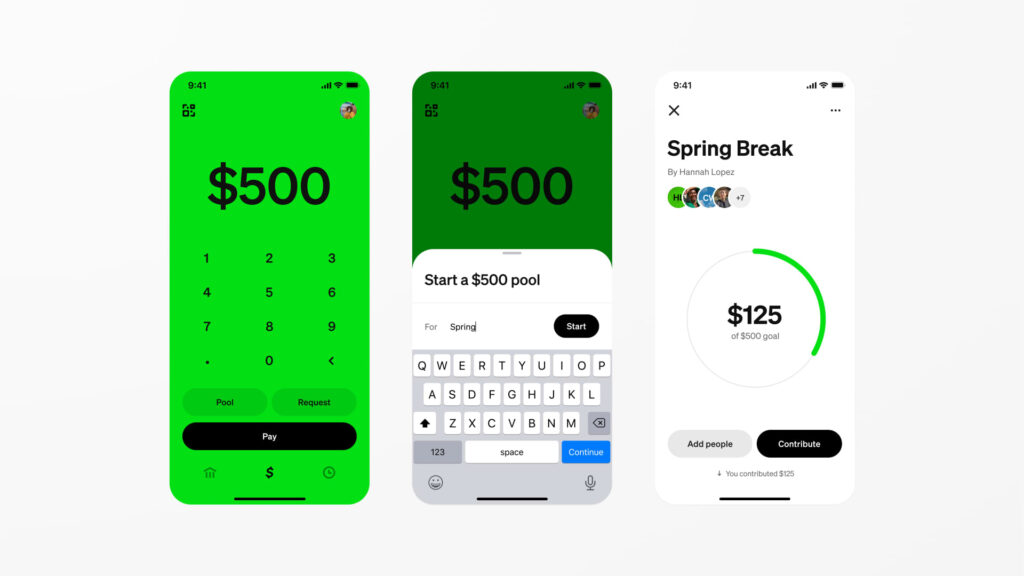
How to Add People on Cash App: Step-by-Step Guide
Adding contacts to Cash App is quick and simple. Here’s exactly how to do it:
Step 1: Open Your Cash App
Launch the Cash App on your iPhone or Android device. Make sure you’re logged into your account.
Step 2: Access Your Account Settings
Look in the top-right corner of your home screen. You’ll see a small icon that looks like a person inside a circle. Tap this icon to open your account settings.
Step 3: Find the Invite Section
Scroll down until you see a button that says “Invite Friends, Get $5” or “Invite Friends.” This appears right below your name and $Cashtag. Tap this button.
Step 4: Choose How to Invite People
You’ll see a pop-up screen with two options:
Option 1: Browse Your Phone Contacts
- Scroll through your existing contacts
- Cash App will show which friends already use the app (they’ll have “Uses Cash App” in green text next to their name)
- Tap the checkbox next to anyone you want to invite
- Select multiple people at once if you want
Option 2: Add Someone Manually
- Tap “Add Contact” or the plus icon
- Enter their name, phone number, or email address
- This works great if someone isn’t in your phone contacts yet
Step 5: Send Your Invitations
After selecting everyone you want to invite, tap the “Invite” button in the top-right corner.
A pre-written text message will appear with your unique referral code already included. The message will say something like:
“I use Cash App to send and receive money. Use my code [YOUR CODE] when you sign up and we’ll each get $5. Download it here: [link]”
You can edit this message if you want to personalize it, then tap “Send” to deliver the invitations via text message.
How to Earn the $5 Referral Bonus
Getting your free money is simple, but there are specific requirements:
Requirements for the Referral Bonus
For you to receive $5:
- Your friend must download Cash App using your referral link or code
- They must create a new account (existing users don’t count)
- They must link a debit card to their account
- They must send $5 or more within 14 days of signing up
- The payment must come from their linked debit card (not their Cash App balance)
For your friend to receive $5:
- They get the same $5 bonus once they complete their first $5+ payment
How Long Does It Take to Get Your Bonus?
The $5 referral reward usually appears in your Cash App balance within a few days after your friend completes their first qualifying transaction. You’ll get a notification letting you know the bonus has been added.
How Many People Can You Invite?
Cash App doesn’t publicly limit how many people you can refer, but there may be internal caps on referral bonuses. Most users can invite dozens of friends without issues.
Pro tip: The bonus amount can change. While $5 is currently standard, Cash App sometimes runs promotions offering $10, $15, or even $30 per referral. Check the app regularly to see the current bonus amount.
Understanding Cash App Payment Limits
Before you start sending money, you should know about Cash App’s transaction limits. These limits exist for security and fraud prevention.
Limits for Unverified Accounts
If you haven’t verified your identity, you’ll face these restrictions:
| Time Period | Sending Limit | Receiving Limit |
|---|---|---|
| 7 days | $250 | No limit specified |
| 30 days | No additional limit | $1,000 |
This means an unverified user can send up to $250 every 7 days, whether in one transaction or spread across multiple payments. They can also receive up to $1,000 within any 30-day period.
Limits for Verified Accounts
Once you verify your account by providing your full name, date of birth, and the last 4 digits of your Social Security number, your limits increase dramatically:
| Time Period | Sending Limit | Receiving Limit |
|---|---|---|
| 7 days | $7,500 | Unlimited |
| 30 days | No additional limit | Unlimited |
How to verify your Cash App account:
- Tap your profile icon in the top-right corner
- Scroll down and select “Personal”
- Tap “Verify Identity”
- Enter your full legal name, date of birth, and SSN
- Wait for approval (usually takes a few minutes)
Verification is free and highly recommended if you plan to use Cash App regularly.
How to Send Money After Adding Someone
Once you’ve added people to Cash App, sending them money is incredibly easy:
Quick Send Method
- Open Cash App and tap the $ sign at the bottom of your screen
- Type the amount you want to send
- Tap “Pay”
- Enter the person’s $Cashtag, phone number, or email
- Add a note about what the payment is for (optional but recommended)
- Tap “Pay” again to confirm
The money arrives in their account instantly, and they’ll get a notification right away.
Sending to Recent Contacts
If you’ve paid someone before, Cash App saves them in your recent contacts:
- Tap the $ sign
- Enter the amount
- Tap “Pay”
- Select their name from the list of recent recipients
- Confirm the payment
This makes repeat payments super fast.
Tips for Using Cash App Safely
Cash App is generally secure, but like any payment app, you should follow these safety guidelines:
Protect Your Account
- Enable security lock: Set up a PIN, Touch ID, or Face ID in your settings
- Never share your PIN or sign-in code: Cash App will never ask for this information
- Use a strong password: Mix letters, numbers, and symbols
- Enable notifications: Get alerts for every transaction so you can catch unauthorized activity
Avoid Common Scams
Only send money to people you know and trust. Unlike credit card purchases, Cash App payments cannot be reversed once sent.
Red flags to watch out for:
- Someone asking you to send money for a prize or contest
- People claiming to be from Cash App support asking for your PIN
- Buyers who send you more money than agreed and ask for a refund
- Anyone asking you to send money before receiving goods or services
- Messages with links claiming your account is locked or suspended
Important: Cash App support will never ask you to send them money or share your PIN. If someone claiming to be from Cash App asks for this, it’s a scam.
Verify Recipients Before Sending
Always double-check that you’re sending money to the right person:
- Confirm their $Cashtag matches what they told you
- Look at their profile picture and display name
- If sending a large amount, send $1 first to verify it’s the right person
Once you hit send, the money is gone instantly and cannot be recalled.
Cash App vs Other Payment Apps: Quick Comparison
How does Cash App stack up against competitors when it comes to adding people and sending money?
| Feature | Cash App | Venmo | Zelle | PayPal |
|---|---|---|---|---|
| Referral bonus | Yes ($5 typical) | Sometimes | No | Sometimes |
| Both people need app | Yes | Yes | No (bank to bank) | Yes |
| Instant transfers | Yes (to app users) | Yes (to app users) | Yes | Yes (to PayPal users) |
| Social feed | No | Yes (optional) | No | No |
| Investment options | Yes (stocks, Bitcoin) | No | No | No |
| Free debit card | Yes | Yes | No | Yes |
| Business features | Yes | No | No | Yes |
When to choose Cash App:
- You want to earn referral bonuses
- You’re interested in buying Bitcoin or stocks
- You want a simple, clean interface
- You need a free debit card
When to choose alternatives:
- Zelle: When sending to someone who doesn’t want to download another app (works through most banking apps)
- Venmo: When you want social features to see friends’ transactions
- PayPal: When buying from online merchants who don’t accept Cash App
Frequently Asked Questions
Can I add someone on Cash App without their phone number?
Yes. You can add people using their $Cashtag, email address, or phone number. If you only know their $Cashtag, just type it into the search field when sending money.
What if the person I want to pay doesn’t show up in my contacts?
Make sure you’ve given Cash App permission to access your contacts. Go to your phone’s Settings, find Cash App, and enable contact access. If the person still doesn’t appear, you can enter their information manually or send them your referral link to join.
Do both people get $5 when someone joins?
Yes. When your friend signs up using your referral code and sends their first $5+ payment from a linked debit card, you both receive $5.
Can I invite people through email instead of text?
Cash App primarily uses text messaging for invitations, but you can copy your referral code and share it however you want (email, social media, in person). Your friend just needs to enter the code when signing up.
How do I find my Cash App referral code?
Open Cash App, tap your profile icon, scroll down to “Invite Friends,” and you’ll see your unique code. You can also find it in the pre-written invitation message.
Is there a limit to how much money I can send on Cash App?
Yes. Unverified accounts can send $250 per week. Verified accounts can send $7,500 per week. To increase your limit, verify your identity in the app settings.
Getting Started: Your Action Plan
Ready to start adding people on Cash App? Here’s your quick action plan:
Today:
- Download Cash App if you haven’t already (free on App Store and Google Play)
- Create your account and choose a unique $Cashtag
- Link your debit card or bank account
- Verify your identity to unlock higher sending limits
This week:
- Open the app and tap your profile icon
- Select “Invite Friends, Get $5”
- Add 5-10 friends who would benefit from using Cash App
- Send personalized invitation messages
- Help your friends complete their first $5+ transaction
This month:
- Collect your referral bonuses as friends join
- Get comfortable sending and receiving money
- Explore extra features like the Cash Card or Bitcoin investing
- Continue inviting friends to earn more bonuses
Final Thoughts
Adding people on Cash App is incredibly straightforward once you know where to look. The built-in referral system makes it even better because you can earn money just by introducing friends to a service that makes their lives easier.
Remember, the key to maximizing your Cash App experience is getting your friends on board. The more people in your circle who use Cash App, the easier it becomes to split bills, pay back loans, or send quick gifts. And with the $5 referral bonus, everyone wins.
Start by inviting your closest friends and family who you regularly exchange money with. Once they see how convenient Cash App is, they’ll likely invite their own contacts, creating a network effect that makes peer-to-peer payments seamless for everyone.
Download Cash App today, send your first invitation, and start enjoying faster, easier money transfers with the people who matter most.

